
Zoom
IceCubes captures Zoom meeting transcripts through the web client with full speaker detection and real-time sync.
How It Works
When you join a Zoom meeting, IceCubes:
- Detects the Zoom meeting page (app.zoom.us)
- Automatically enables live transcription if not already on
- Opens a sidebar panel with the live transcript
- Captures speaker names and timestamps
- Syncs to your IceCubes account in real-time
Requirements
- Browser: Google Chrome or Microsoft Edge
- Meeting access: Join via web client (app.zoom.us)
- Extension: IceCubes extension installed and signed in
- Zoom setting: Automated captions enabled in your Zoom account settings
Web Client Only
IceCubes works with Zoom meetings joined via the web browser, not the desktop app. Join meetings through the web client at app.zoom.us. A macOS desktop app with Zoom support is currently in beta — contact admin@icecubes.app to try it.
Enable Zoom Settings for IceCubes
IceCubes only needs one Zoom setting enabled to work correctly:
- Go to your Zoom account settings (via the Zoom web portal)
- Navigate to In Meeting (Advanced)
- Turn on Automated captions
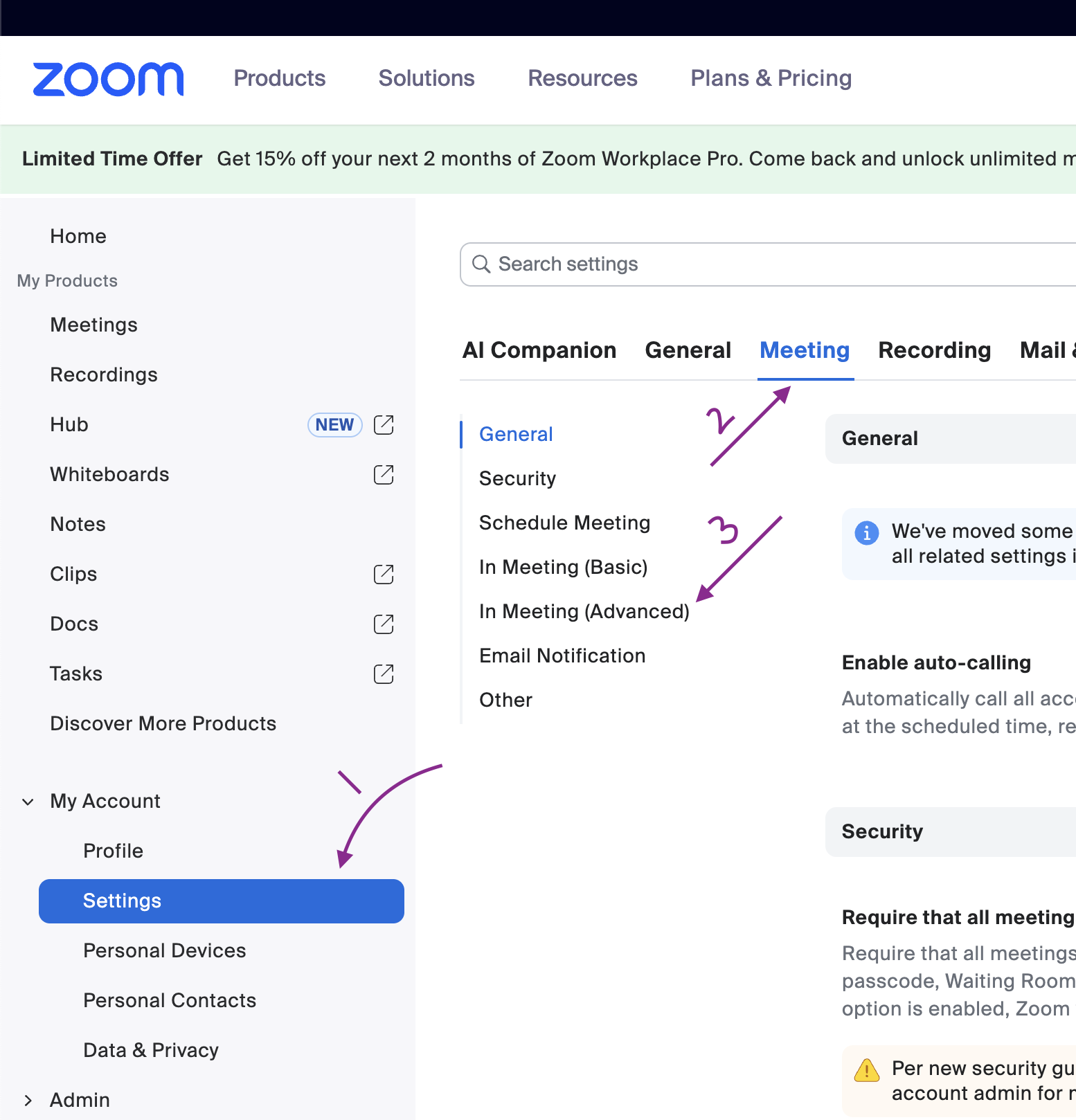
Navigate to Settings → Meeting → In Meeting (Advanced)
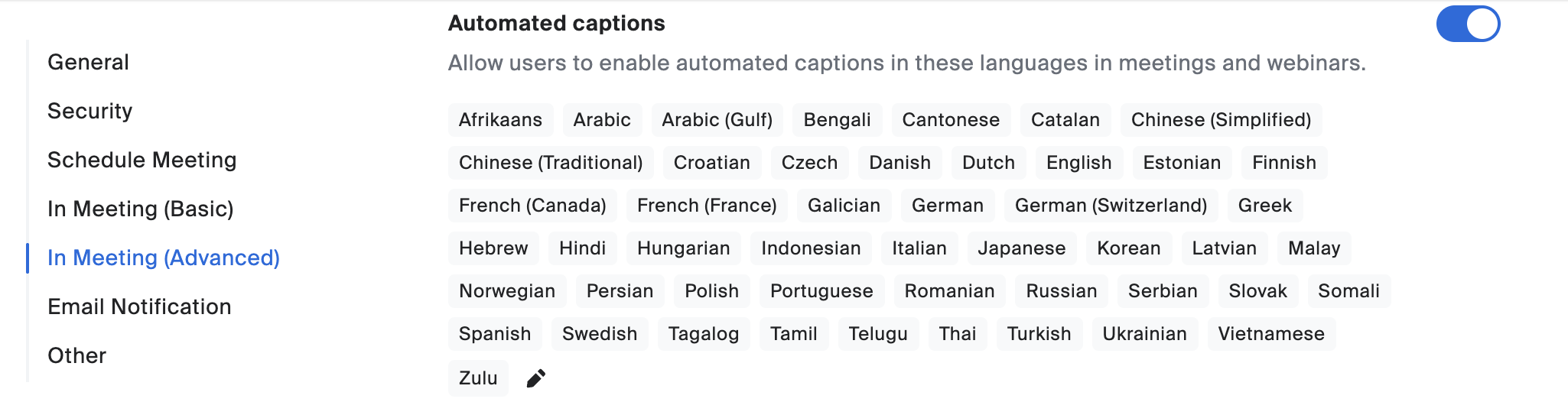
Turn on the Automated captions toggle
This is the only Zoom account-level setting required. Once enabled, IceCubes will automatically capture captions when you join meetings via the web browser.
Not a Zoom Admin? What to Do
In many organizations, Zoom settings are controlled by an IT administrator. If the “Automated captions” toggle is grayed out or missing in your settings, it means your Zoom admin has locked this setting at the account or group level. You cannot enable it yourself.
Here's what to do:
- Ask your Zoom admin to enable Automated captions under Settings → Meeting → In Meeting (Advanced) in the Zoom admin portal. They can enable it for your entire account or for a specific user group that includes you.
- Share this page with your IT team — the only setting needed is the Automated captions toggle. No other Zoom configuration changes are required.
- Check your Zoom plan — some Zoom Basic (free) plans do not include automated captions. Your organization may need a Zoom Pro, Business, or Enterprise plan.
Sample message to send your Zoom admin
“Hi, I'm using IceCubes for meeting notes and need the Automated captions setting enabled in our Zoom account. It's under Admin → Settings → Meeting → In Meeting (Advanced). This only enables Zoom's built-in captions — no audio or video is recorded by IceCubes, and no bot joins the meeting.”
Allow Captioning as the Meeting Host
If you're the host of the Zoom meeting, you need to allow closed captioning for the session:
- Click the More (...) button in the Zoom toolbar and select Captions
- Go to Host Caption Control Settings
- Turn on Allow Closed Captioning for this meeting
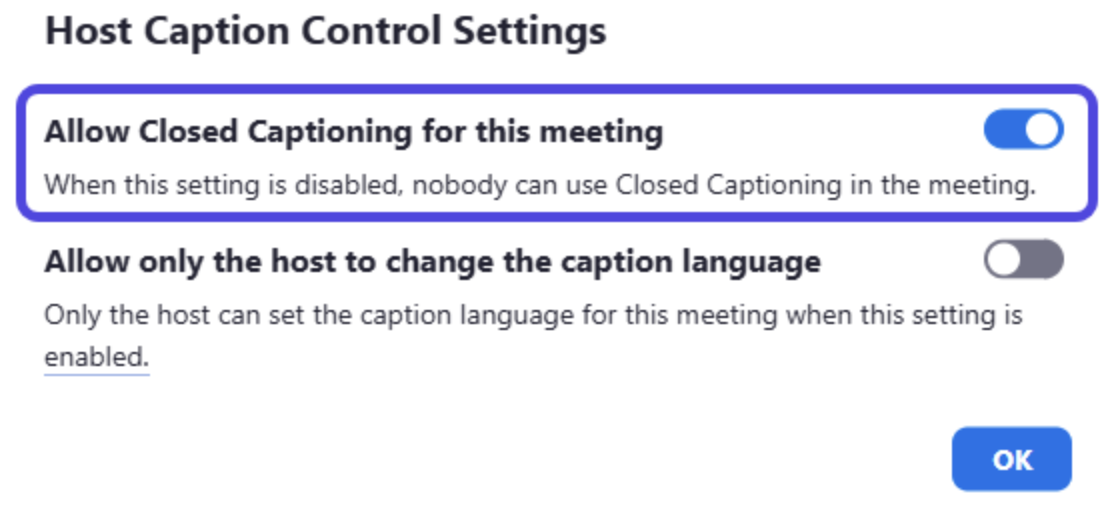
Enable Allow Closed Captioning for this meeting in Host Caption Control Settings
Optional host setting
Allow only the host to change the caption language — Enable this if you want to prevent participants from switching the caption language during the meeting.
Change the Caption Language
If the host allows it, any participant can change the caption language during the meeting:
- Click More (...) in the Zoom toolbar
- Select Captions → Caption language
- Choose the language you want to use
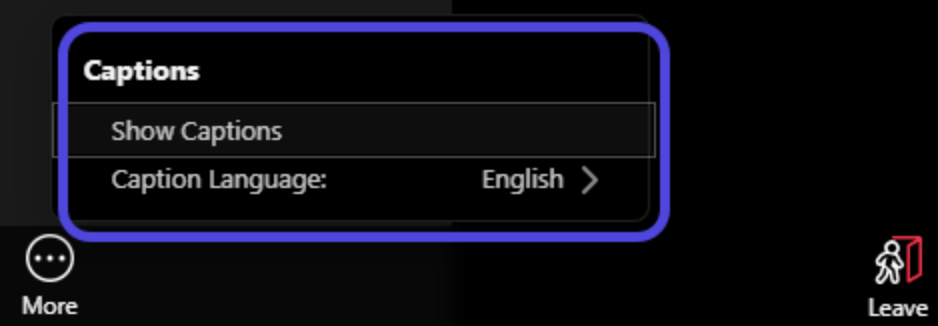
Click More (...) → Captions → Caption Language to change the language
You can also change the transcription language directly from the IceCubes sidebar panel using the language dropdown in the toolbar. This adjusts which language Zoom's transcription engine listens for.
Speaker Detection
Zoom identifies speakers by their display name in the meeting. IceCubes captures this information along with the transcript.
- Speakers are labeled with their Zoom display name
- You can rename speakers after the meeting if needed
Troubleshooting
Transcript isn't capturing
- Ensure you're using the web client (app.zoom.us), not the desktop app
- Check that Automated captions is enabled in your Zoom account settings under In Meeting (Advanced)
- Ask the host to enable closed captioning for the meeting
- Make sure you're signed in to the IceCubes extension
- Try refreshing the page
Sidebar panel doesn't open
- Click the IceCubes extension icon to manually open
- Make sure you're signed in to the extension
- Check browser permissions for the extension
“Live Transcription” option not available
The host's Zoom account settings control this:
- Free accounts may not have transcription available
- Ask the host to check their Zoom account settings under In Meeting (Advanced)
- Some organizations disable this feature via admin policies
Automated captions setting is grayed out or locked
This means your Zoom organization admin has locked the setting at the account or group level. You cannot change it yourself.
- Ask your Zoom admin to enable Automated captions under Settings → Meeting → In Meeting (Advanced)
- They can enable it for your entire account or for a specific user group
- Share the “Not a Zoom Admin?” section above with your IT team
- Some Zoom Basic (free) plans do not include this feature — your org may need Zoom Pro or higher
Does IceCubes work with the Zoom desktop app?
IceCubes primarily works with Zoom meetings joined via the web browser. A macOS desktop app with Zoom support is currently in beta. Contact admin@icecubes.app if you're interested in trying it.
Does IceCubes require a bot to join the meeting?
No. IceCubes is a botless AI note taker. It captures transcripts directly from the meeting's built-in captions without adding any bot or additional participant to the call.
Duplicate or missing segments
Zoom sometimes sends partial sentences that get completed later. IceCubes uses substring-based deduplication to handle this. If you notice issues, the transcript can be edited after the meeting.
How do I access unsaved transcripts?
If the IceCubes extension was active during the meeting, your transcript should be available in your IceCubes dashboard under recent meetings. If you closed the browser tab before the transcript was saved, the data may not have been captured.
Supported Features
When using the Zoom web client, IceCubes provides:
- Full transcript capture - Complete meeting transcription
- Speaker detection - Automatic speaker identification
- Real-time sync - Transcripts sync as you speak
- Sidebar panel - View transcript during the meeting
- No bot required - Captures from built-in captions, no extra participant joins
Privacy Considerations
- IceCubes captures captions directly from Zoom's built-in transcription — no audio is recorded
- Zoom meetings may have their own recording policies
- Some organizations require consent for transcription
- IceCubes stores transcripts in your private account
- Check your organization's meeting recording policies