
In-Meeting Extension Features
During a live meeting, the IceCubes browser extension gives you a powerful sidebar panel (Google Meet) or overlay widget (Zoom & Teams) with real-time transcription, AI chat, notes, and more — all without any bot joining your call.
Live Transcript
As your meeting progresses, the extension captures every word spoken and displays it in real time. Each segment shows the speaker name and timestamp, so you always know who said what and when.
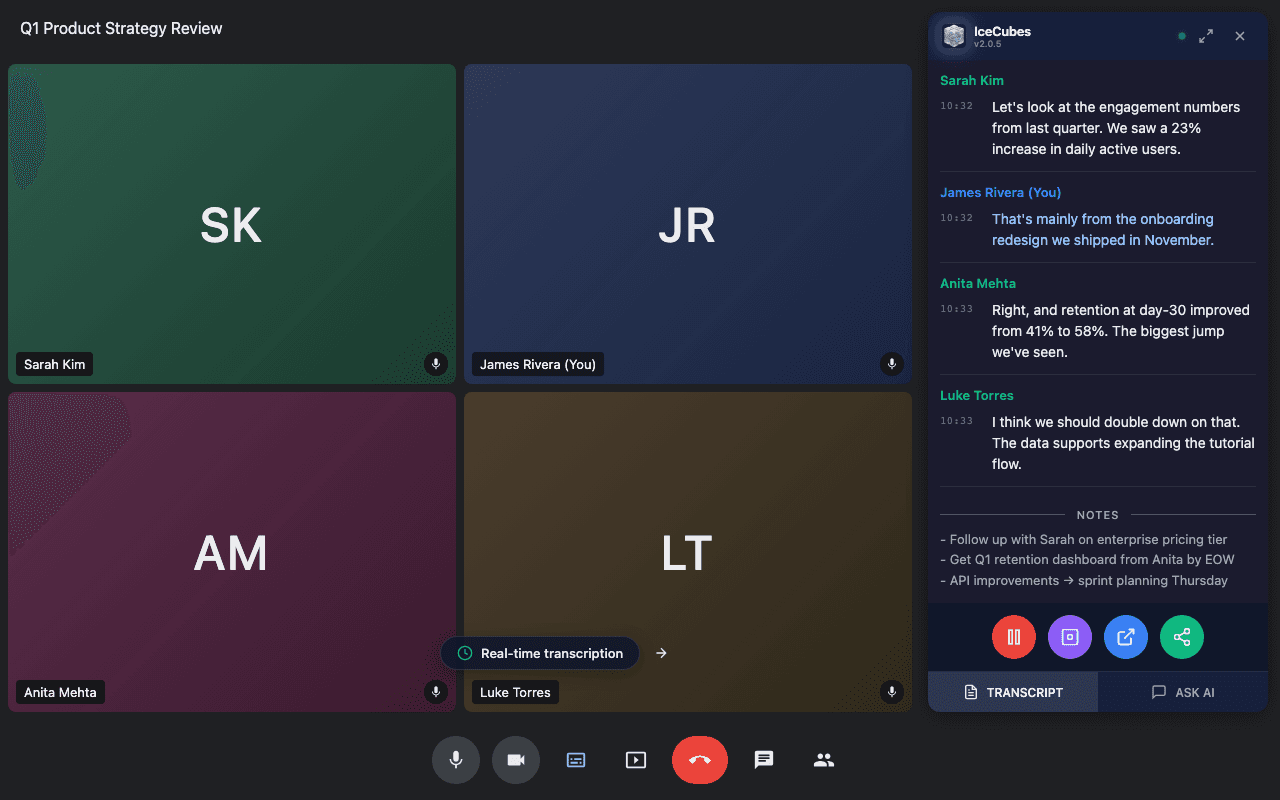
Live transcript sidebar during a Google Meet call — speaker names, timestamps, and full conversation captured in real time.
- Speaker identification — each speaker is color-coded and labeled automatically
- Real-time updates — text appears as it's spoken, with no delay
- Scroll back — missed something? Scroll up in the transcript at any time
- Auto-sync — the transcript is automatically saved to your IceCubes account when the meeting ends
Ask AI (In-Meeting Chat)
Don't wait until the meeting is over — ask Icy questions about your meeting while it's still happening. The AI has full context of the live transcript and can help you in real time.
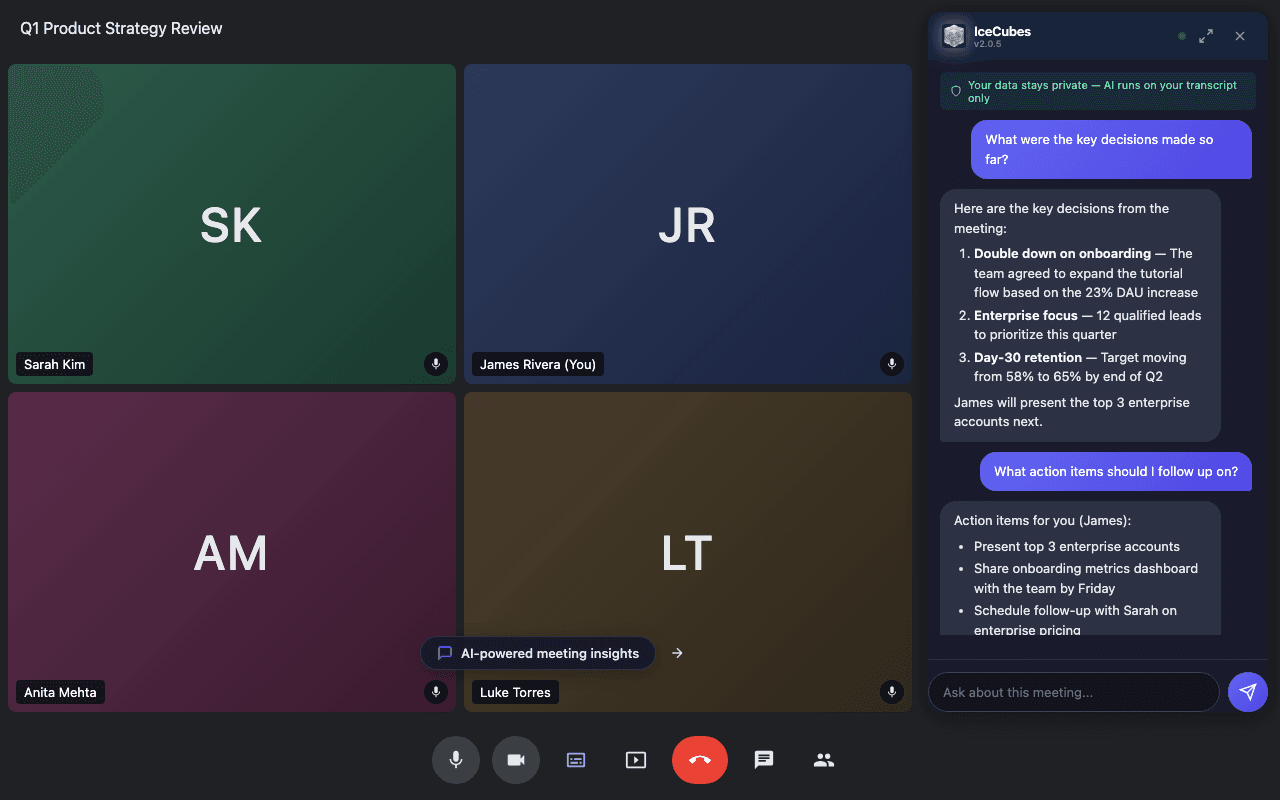
Ask Icy questions during the meeting — get instant answers about decisions, action items, and key points discussed so far.
Example questions you can ask during a meeting:
“What were the key decisions made so far?”
“What action items should I follow up on?”
“Summarize what Sarah said about the timeline”
“Draft a follow-up email based on this meeting”
Each AI question uses 1 AI credit. The AI sees the full transcript captured so far, so answers are always grounded in what was actually said.
Quick Notes
Jot Down Thoughts During the Meeting
Use the notes tab to capture your own thoughts, observations, and reminders right alongside the transcript. Notes are saved with the meeting and accessible later in the webapp.
Notify Participants
Let Others Know You're Transcribing
With one click, send a chat message to meeting participants letting them know the meeting is being transcribed. This helps with transparency and consent. You can also enable auto-notify in settings to do this automatically for every meeting.
Popout Window
If the sidebar takes up too much screen space, pop the transcript out into a separate resizable window. This lets you view the live transcript alongside the meeting without the overlay covering the video. Click the popout button in the toolbar to open the transcript in its own window, then resize and position it however you like.
Speaker Analytics
Real-Time Talk Time Tracking
See who's been speaking the most with live speaker analytics. The extension tracks speaking time and word count per participant, showing percentages and duration breakdowns. This data syncs to the webapp for post-meeting review.
Platform-Specific Behavior
| Feature | Google Meet | Zoom | Teams |
|---|---|---|---|
| Display | Sidebar panel | Overlay widget | Overlay widget |
| Live transcript | Yes | Yes | Yes |
| Ask AI (in-meeting) | Yes | Yes | Yes |
| Quick notes | Yes | Yes | Yes |
| Notify participants | Yes | Yes | Yes |
| Popout window | Yes | Yes | Yes |
| Browser requirement | Chrome / Edge | Web client only | Web client only |
| Caption setup | Auto-enabled | Automated Captions required (may need Zoom admin) | Auto-enabled |
After the Meeting
When the meeting ends, IceCubes automatically syncs the full transcript to your account. From the webapp, you can then:
- Generate an AI summary with key points and action items
- Ask AI more questions via IceCubesGPT
- Share the meeting with colleagues
- Edit transcript segments and rename speakers
- Export transcripts and summaries